
Commands and entry points
The plugin registers four commands and one file-menu item. Every write is one transaction, undone with a single
Ctrl/Cmd+Z.
The four commands
| Command | What it does | Note |
|---|---|---|
| Set image caption and layout | opens a dialog for caption, layout, side, width and gap | only those fields change, everything else is preserved |
| Clear image caption and layout | empties the caption and removes all layout parameters | also removes ag:isolate / ag:exclude / ag:rows / ag:group |
| Restore document default image style | resets the whole note after confirmation, then reports how many images changed | one transaction, one undo step |
| Export PDF (AutoGallery) | opens the export dialog | desktop only, and the active file must be Markdown |
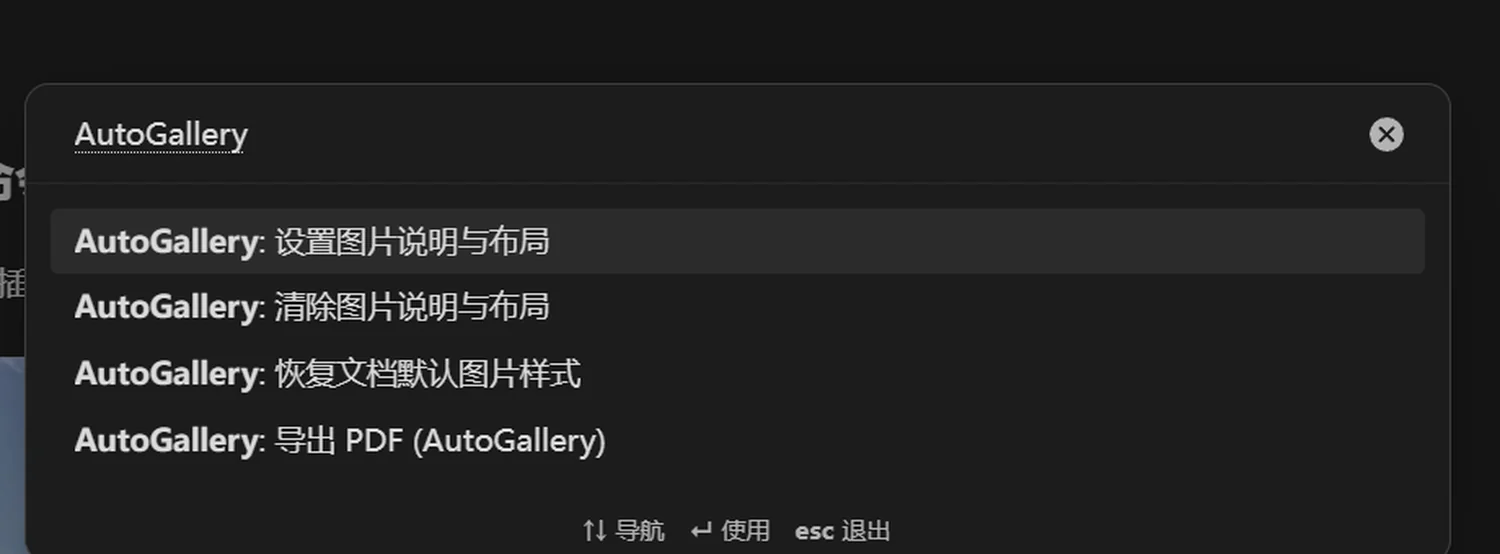
The command palette lists the four AutoGallery commands.
Entry points
| Entry point | What you can do there |
|---|---|
Command palette (Ctrl/Cmd+P) | all four commands are searchable |
| File list context menu | Export PDF (AutoGallery) |
| Hover actions on an image (Live Preview) | crop, isolate, exclude, restore |
| Settings page, "Export current note" | export the current note |
There is no ribbon icon and no status-bar item — the plugin does not want to occupy the interface when you are not looking at an image.
What happens behind one write
- Read the current image line and parse its existing parameters.
- Change only the keys involved this time; write the rest back in their original order.
- Commit as a single editor transaction, so the undo stack gains exactly one step.
The write order is fixed:
isolate → exclude → group → layout → side → width → gap → rows → crop → topSo dragging a width never displaces a hand-written crop, and reordering never produces a pointless diff. That matters in vaults tracked with Git.
Undo granularity
| Action | Granularity |
|---|---|
| Drag a divider | one step |
| Drag the corner grip | one step |
| Save from the caption dialog | one step |
| Restore the whole note | one step (the entire reset rolls back together) |
| Save from the crop dialog | one step |
Pressing Esc mid-drag cancels it and produces no undo step at all.
Which entry point for which job
| Goal | Use |
|---|---|
| caption + width + gap | the caption dialog |
| cropping | the crop dialog |
| column width / binding a row | gallery handles |
| clear manual tweaks on one image | the clear command |
| clear manual tweaks in the note | the restore command |
| change the whole width system | templates plus routing |